How to Build an E-Commerce Website in Uganda That Accepts Mobile Money Instantly.
Uganda’s online shopping market is growing rapidly, and businesses that embrace digital commerce are gaining a significant competitive advantage. How to Build an E-Commerce Website in Uganda That Accepts Mobile Money Instantly is one of the most important questions local entrepreneurs are asking today because customers increasingly expect fast, convenient, and secure payment options.
If you own a boutique in Kampala, a cosmetics business in Mukono, an electronics shop in Entebbe, or even a home-based startup, relying solely on WhatsApp and Instagram DMs can limit your growth. Orders get lost, customer information becomes difficult to track, and payment verification often requires manual follow-up.
A professionally built e-commerce website changes everything. Customers can browse products, place orders, make payments instantly using MTN Mobile Money or Airtel Money, and receive confirmation automatically.
This guide walks you through the exact process.
Table of Contents
Why Ugandan Businesses Need E-Commerce
Benefits of Mobile Money Integration
Choosing the Right E-Commerce Platform
How to Build an E-Commerce Website in Uganda That Accepts Mobile Money Instantly
Setting Up MTN Mobile Money Payments
Setting Up Airtel Money Payments
Configuring Delivery Zones
Common E-Commerce Mistakes
Expert Tips for Growing Online Sales
Frequently Asked Questions
Conclusion
Why Ugandan Businesses Need E-Commerce
The way Ugandans shop has changed dramatically over the last few years.
Consumers now search online before making purchasing decisions. Whether someone is buying clothing, electronics, beauty products, groceries, or household items, they want convenience.
Many local businesses still operate through:
WhatsApp orders
Facebook Marketplace
Instagram DMs
Phone calls
While these methods work initially, they create several challenges:
Lost Customer Orders
Messages can easily be buried among hundreds of conversations.
Manual Payment Verification
Business owners spend valuable time checking Mobile Money transactions individually.
Lack of Professional Trust
Modern consumers trust businesses that have professional websites more than businesses that rely entirely on social media.
Poor Inventory Tracking
Manual systems often lead to overselling products that are already out of stock.
An e-commerce website solves these issues by centralizing your entire sales process.
Benefits of Mobile Money Integration for Ugandan Online Stores
One major reason online businesses fail is offering payment methods customers do not use.
In Uganda, Mobile Money dominates digital transactions.
Customers Can Pay Instantly
Customers complete purchases without contacting your team.
The entire process happens automatically.
Higher Conversion Rates
When customers can pay using familiar services like MTN Mobile Money and Airtel Money, they are more likely to complete purchases.
Reduced Administrative Work
Automated payment verification saves hours every week.
Secure payment gateways make customers feel comfortable buying online.
How to Build an E-Commerce Website in Uganda That Accepts Mobile Money Instantly
Building an online store requires more than simply creating a website.
You need a complete digital sales system.
Step 1: Register a Domain Name
Choose a memorable domain that reflects your business.
Examples:
yourshop.ug
yourbrand.com
yourbusiness.co.ug
Keep it short, professional, and easy to remember.
Step 2: Purchase Reliable Hosting
Your hosting provider affects:
Website speed
Security
Uptime
Customer experience
Fast websites convert significantly better than slow websites.
Step 3: Select an E-Commerce Platform
Popular choices include:
WooCommerce
Shopify
Magento
OpenCart
For many Ugandan businesses, WooCommerce offers flexibility and affordability.
Step 4: Design a Professional Store
Your design should include:
Mobile responsiveness
Product categories
Search functionality
Clear navigation
Professional branding
Remember that most Ugandan shoppers browse using smartphones.
How to Build an E-Commerce Website in Uganda That Accepts Mobile Money Instantly With Local Payments
The next step is integrating local payment solutions.
This is where your store becomes truly useful for Ugandan shoppers.
MTN Mobile Money Integration
MTN Mobile Money remains one of the most widely used payment methods in Uganda.
Benefits include:
Instant transactions
Wide customer adoption
Secure payment processing
Real-time payment confirmation
When integrated properly, customers simply enter their phone number and approve payment directly on their mobile device.
Airtel Money Integration
Airtel Money provides another essential payment option.
Offering both payment methods increases accessibility and reduces cart abandonment.
Customers prefer having multiple payment choices.
Choosing a Payment Gateway for Uganda
Most businesses connect Mobile Money through payment gateways.
A gateway acts as the bridge between your website and Mobile Money networks.
Features to look for include:
Security
Protect customer information and payment data.
Automatic Confirmation
Orders should update automatically after successful payment.
Easy Integration
The gateway should work seamlessly with your e-commerce platform.
Reporting Features
Track revenue, orders, and customer activity.
Configuring Delivery Zones for Kampala, Entebbe, and Mukono
Shipping setup is often overlooked.
However, it significantly affects customer satisfaction.
Kampala Deliveries
Offer:
Same-day delivery
Next-day delivery
Express delivery
Entebbe Deliveries
Clearly define:
Delivery fees
Expected delivery times
Pickup options
Mukono Deliveries
Create separate shipping zones for accurate pricing.
Customers appreciate transparency before checkout.
Common Mistakes Businesses Make
Ignoring Mobile Optimization
Most Ugandan shoppers browse from smartphones.
A poor mobile experience hurts conversions.
Complicated Checkout Processes
Keep checkout simple.
Every extra step reduces completed purchases.
Limited Payment Options
Offering only one payment method excludes potential customers.
Poor Product Images
Professional photos improve trust and increase sales.
Slow Website Performance
Even a few seconds of delay can cause customers to leave.
Expert Tips to Increase E-Commerce Sales
Businesses that succeed online focus on continuous improvement.
Invest in SEO
Search engine optimization helps customers find your store organically.
Use High-Quality Product Photography
Professional images significantly improve conversion rates.
Collect Customer Reviews
Reviews build trust and credibility.
Automate Customer Notifications
Send:
Order confirmations
Shipping updates
Delivery confirmations
Analyse Website Data
Monitor:
Visitor behaviour
Product performance
Checkout abandonment rates
Data-driven decisions lead to faster growth.
Real-World Example
Imagine a fashion boutique in Kampala receiving 50 customer inquiries daily through Instagram.
The owner manually responds to messages, confirms payments, and tracks deliveries.
As sales increase, managing everything becomes overwhelming.
After launching a dedicated e-commerce website with Mobile Money integration:
Orders become automated
Payments are verified instantly
Inventory updates automatically
Customer satisfaction improves
Sales scale more efficiently
This is why more Ugandan businesses are investing in professional online stores.
Internal Link Opportunities
Professional Web Design Services
E-Commerce Development Services
Mobile App Development
SEO Services
Digital Marketing Services
External Resources
Google Search Central
Google Analytics Documentation
Uganda Communications Commission
MTN Mobile Money Business Resources
Airtel Money Merchant Resources
Frequently Asked Questions
How much does it cost to build an e-commerce website in Uganda?
Costs vary depending on features, design requirements, and payment integrations. Small businesses can start with affordable solutions and scale over time.
Can I accept MTN Mobile Money payments on my website?
Yes. By integrating a supported payment gateway, customers can pay directly through MTN Mobile Money.
Can I integrate Airtel Money into my online store?
Absolutely. Many payment providers support Airtel Money integrations.
How long does it take to build an e-commerce website in Uganda?
Most projects take between one and four weeks depending on complexity.
Is Mobile Money secure for online payments?
Yes. When implemented through reputable payment gateways, Mobile Money payments are secure and reliable.
What platform is best for Ugandan online stores?
WooCommerce is often preferred because it offers flexibility, affordability, and strong integration capabilities.
Do I need technical skills to run an online store?
Not necessarily. Most modern e-commerce systems are user-friendly and can be managed without advanced technical knowledge.
Conclusion
Understanding How to Build an E-Commerce Website in Uganda That Accepts Mobile Money Instantly is essential for businesses looking to compete in today’s digital marketplace. By combining a professional website, secure MTN Mobile Money and Airtel Money integrations, optimized delivery zones, and a customer-focused shopping experience, Ugandan businesses can automate operations, increase sales, and build stronger relationships with customers.
The businesses that invest in e-commerce today are positioning themselves for long-term growth tomorrow.
Have you ever wondered how some blogs seem to dominate Google search results while generating thousands—or even millions—of dollars every year?
Many people assume successful blogs make money simply because they attract a lot of visitors. While traffic is important, the real secret lies in how that traffic is monetized.
The highest-ranking blogs on Google have developed sophisticated systems that turn readers into revenue through multiple income streams. Instead of relying on a single source of income, they combine advertising, affiliate marketing, digital products, sponsorships, and memberships to create highly profitable online businesses.
Let’s explore the five primary ways top-ranking blogs generate consistent monthly revenue.
Why Ranking #1 on Google Is So Valuable
When a blog ranks at the top of Google’s search results, it gains access to highly targeted visitors who are actively searching for information, products, or solutions.
Unlike social media traffic, which often disappears after a few hours, Google traffic can continue flowing for months or even years after a blog post is published.
This creates a powerful business asset.
A single article ranking for a high-volume keyword can attract thousands of visitors every month without ongoing advertising costs.
The question then becomes:
How do successful blogs turn those visitors into income?
1. Display Advertising
One of the most common revenue streams for successful blogs is display advertising.
When visitors browse a blog, advertisements are displayed throughout the website. The blog owner earns money whenever these ads are viewed or clicked.
How It Works
Advertisers pay advertising networks to place ads in front of relevant audiences.
The network then shares a portion of that revenue with the blog owner.
The more traffic a blog receives, the more advertising income it can generate.
Premium Ad Networks
Many top blogs eventually qualify for premium advertising networks that pay significantly more than basic ad platforms.
These networks often require substantial traffic levels before accepting publishers.
Benefits include:
Higher advertising rates
Better quality advertisers
Improved user experience
Increased earnings per visitor
For blogs generating hundreds of thousands of monthly visitors, advertising alone can produce a significant income stream.
2. Affiliate Marketing
Affiliate marketing is one of the most profitable monetization methods used by successful bloggers.
Instead of selling their own products, bloggers recommend products or services offered by other companies.
When a reader clicks a special tracking link and makes a purchase, the blogger earns a commission.
Why Affiliate Marketing Works So Well
Visitors often arrive on blogs seeking recommendations.
Examples include:
Best web hosting providers
Best laptops for students
Best fitness equipment
Best accounting software
Best marketing tools
By providing valuable reviews and recommendations, bloggers help readers make purchasing decisions while earning commissions.
Examples of Affiliate Content
Successful affiliate articles often include:
Product reviews
Comparison guides
Buying guides
Tutorials
Resource pages
Some high-performing affiliate articles continue generating commissions for years after publication.
3. Selling Digital Products
Many of the most profitable blogs eventually move beyond advertising and affiliate income by creating their own products.
Digital products offer some of the highest profit margins available online because they can be sold repeatedly without inventory costs.
Popular Digital Products
Examples include:
eBooks
Online courses
Templates
Design assets
Business documents
Marketing resources
Software tools
Membership libraries
Once created, these products can be delivered automatically to customers around the world.
Why Digital Products Are Powerful
Unlike affiliate marketing, where commissions are shared with another company, digital product sales allow creators to keep most or all of the revenue.
This makes digital products one of the fastest ways to increase blog profitability.
4. Sponsored Content
As a blog grows in authority and attracts a large audience, brands often become interested in reaching that audience.
One way they do this is through sponsored content.
What Is Sponsored Content?
Sponsored content occurs when a company pays a blog owner to feature its product, service, or brand.
This can take several forms:
Product reviews
Sponsored articles
Brand mentions
Case studies
Newsletter promotions
The blog receives payment in exchange for exposure to its audience.
Why Brands Pay for Blog Exposure
A top-ranking blog often attracts highly targeted visitors.
For businesses, gaining exposure to those readers can be extremely valuable.
As a result, successful blogs can command premium sponsorship fees.
Well-established blogs sometimes earn thousands of dollars from a single sponsored article.
5. Premium Memberships and Subscriptions
One of the most reliable revenue models used by top blogs is recurring memberships.
Instead of relying on one-time purchases, blogs create exclusive content or tools available only to paying members.
Subscribers pay monthly or yearly fees for access.
What Membership Blogs Offer
Membership programs may include:
Exclusive articles
Private communities
Industry research
Premium tools
Educational resources
Video training
Live events
Expert support
Because payments recur each month, memberships provide predictable income.
Why Recurring Revenue Matters
Many successful bloggers consider memberships their most valuable revenue stream because they reduce dependence on traffic fluctuations.
Even if traffic temporarily drops, recurring subscriptions continue generating revenue.
The Most Successful Blogs Use Multiple Income Streams
The highest-earning blogs rarely rely on just one monetization method.
Instead, they combine several strategies.
For example, a successful blog might generate income from:
Display ads
Affiliate commissions
Digital products
Sponsored content
Membership subscriptions
This diversification creates stability and increases overall profitability.
If one revenue source slows down, others continue generating income.
How Long Does It Take a Blog to Make Money?
One of the biggest misconceptions about blogging is that income appears immediately.
In reality, successful blogs often spend months building content and search visibility before significant revenue arrives.
Factors that influence growth include:
Content quality
Search engine optimization (SEO)
Competition level
Website speed
User experience
Publishing consistency
The blogs ranking at the top of Google today often invested years into creating valuable content before reaching their current position.
Why Website Speed Matters for Blog Revenue
Every monetization strategy discussed above depends on one critical factor:
Traffic.
And traffic depends heavily on website performance.
Slow websites often experience:
Lower Google rankings
Higher bounce rates
Fewer page views
Reduced conversions
That’s why the most successful blogs invest heavily in:
Fast hosting
Technical SEO
Mobile optimization
High-performance website design
A fast website creates a better user experience and helps content rank higher in search results.
Final Thoughts
The number one blogs on Google don’t make money through luck.
They generate revenue by attracting targeted traffic and converting that traffic into income through multiple proven monetization methods.
The most common revenue streams include:
Display advertising
Affiliate marketing
Digital product sales
Sponsored content
Premium memberships
When combined with strong SEO, valuable content, and a fast website, these monetization strategies can transform a blog from a simple content platform into a highly profitable online business.
If your goal is to build a blog that ranks on Google, attracts consistent traffic, and generates real revenue, investing in a professionally built, SEO-optimized website is one of the smartest places to start.
Your website might look professional, have great content, and offer excellent products or services—but if it’s hosted on cheap shared hosting, visitors may never stick around long enough to see any of it.
Website speed has become one of the most important factors affecting user experience, search engine rankings, lead generation, and online sales. Yet many business owners unknowingly sabotage their website’s performance by choosing the cheapest hosting plan available.
If your website takes several seconds to load, experiences random slowdowns, or occasionally becomes unavailable, your hosting provider could be the root cause.
Let’s explore why cheap shared hosting slows websites down and what you can do to fix it.
What Is Shared Hosting?
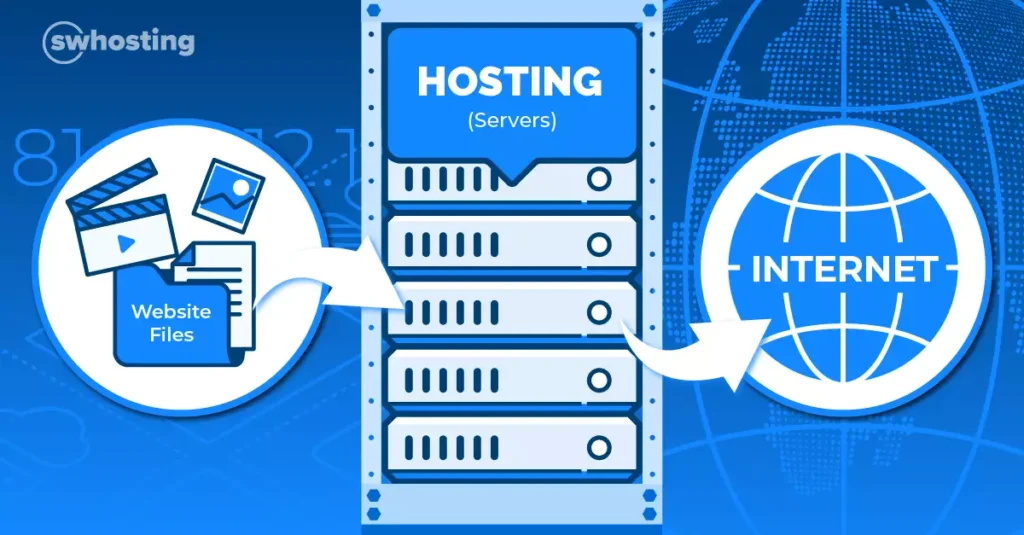
Shared hosting is a hosting environment where hundreds—or even thousands—of websites share the same server resources.
Instead of having dedicated processing power, memory, and storage, all websites on the server compete for the same pool of resources.
Hosting companies offer these plans at very low prices because the costs are spread across many customers.
While shared hosting may be suitable for small personal websites or hobby projects, it often struggles to meet the demands of a growing business website.
Imagine running a business in a building where thousands of other businesses share the same electricity, water supply, and internet connection.
Everything works fine until one tenant suddenly starts consuming most of the resources.
The same thing happens with shared hosting.
When other websites on the server demand more resources, your website is left fighting for what’s available.
The result?
Slow page loading times
Delayed server responses
Website downtime
Poor user experience
Let’s look at the biggest reasons this happens.
1. Bad Neighbor Syndrome
One of the most common problems with shared hosting is known as “Bad Neighbor Syndrome.”
Because your website shares a server with many others, the behavior of neighboring websites can directly affect your performance.
For example, if another website on the server:
Experiences a sudden traffic spike
Runs poorly optimized software
Gets infected with malware
Sends large amounts of spam emails
Uses excessive server resources
Your website may become slower even though nothing has changed on your end.
This means your business performance is partially dependent on the actions of strangers you don’t know.
The Hidden Risk
In severe cases, a compromised website on the same server can even impact:
Security
Email deliverability
Server reputation
Uptime reliability
This creates risks that many business owners never realize exist.
2. Poor User Experience Drives Visitors Away
Modern internet users are impatient.
Research consistently shows that visitors expect websites to load within just a few seconds.
When a page takes too long to load, people don’t wait.
They leave.
Potential customers may:
Abandon your website
Visit a competitor
Lose confidence in your business
Never return
Even a small delay can significantly reduce conversions.
What Visitors Expect Today
Users generally expect:
Instant navigation
Fast page loads
Smooth mobile experiences
Reliable performance
A slow website creates frustration and damages trust before customers even engage with your products or services.
Slow Websites Lose Sales
Consider the customer journey:
A visitor clicks your website from Google.
Your page begins loading.
Three seconds pass.
Five seconds pass.
The page still isn’t ready.
Most users simply hit the back button and choose another business.
That lost visitor may have become a paying customer if your website loaded quickly.
3. Google Uses Speed as a Ranking Factor
Website speed doesn’t just affect visitors.
It also affects how search engines evaluate your website.
Google has publicly confirmed that page speed and user experience metrics influence search rankings.
A slow website can negatively impact:
Search visibility
Organic traffic
Mobile rankings
Core Web Vitals scores
Crawl efficiency
If your competitors have faster websites, Google may prioritize their pages above yours in search results.
Core Web Vitals Matter
Google’s Core Web Vitals measure:
Loading performance
Visual stability
User interaction responsiveness
Cheap hosting often struggles to meet these performance benchmarks because the server itself is overloaded.
Even excellent content can struggle to rank when the underlying infrastructure is slow.
4. Server Response Times Are Often Terrible
One overlooked metric is server response time.
Before a webpage even begins loading, the server must respond to the visitor’s request.
Budget hosting providers frequently overload servers to maximize profits.
As a result:
Requests take longer to process
Database queries become slower
Dynamic pages lag
Overall website responsiveness suffers
A slow server creates delays before your website content even starts appearing.
5. Downtime Can Cost Your Business Money
Cheap hosting plans often experience more outages and interruptions.
When your website goes offline:
Customers cannot contact you
Leads are lost
Sales opportunities disappear
Search engines may encounter crawl errors
Even brief periods of downtime can impact revenue and customer trust.
For businesses that depend on their website, reliability is just as important as speed.
What Is the Solution?
The best solution is upgrading to premium hosting that provides dedicated or guaranteed resources.
This can include:
Managed Cloud Hosting
Cloud hosting distributes resources across multiple servers.
Benefits include:
Faster performance
Better reliability
Improved scalability
Enhanced uptime
Managed WordPress Hosting
Designed specifically for WordPress websites.
Benefits include:
Server-level optimization
Automatic updates
Enhanced security
Better caching systems
Virtual Private Servers (VPS)
A VPS provides dedicated portions of server resources rather than sharing everything equally.
Benefits include:
Greater control
Improved performance
Better resource allocation
Dedicated Servers
For high-traffic websites, dedicated servers provide maximum performance by allocating an entire server to a single business.
Benefits of Upgrading Your Hosting
Businesses often notice immediate improvements after moving away from cheap shared hosting.
Common benefits include:
Faster page load speeds
Better Google rankings
Higher conversion rates
Improved customer experience
Increased website stability
Stronger security
Reduced downtime
For many businesses, upgrading hosting delivers one of the highest returns on investment among all website improvements.
Is Cheap Hosting Ever Worth It?
Cheap shared hosting can work for:
Personal blogs
Small hobby websites
Temporary projects
Websites with very little traffic
However, if your website generates leads, sales, bookings, or customer inquiries, relying on bargain hosting can ultimately cost more than it saves.
Final Thoughts
Your website’s performance is only as strong as the server powering it.
Cheap shared hosting may save a few dollars each month, but it often leads to slower load times, lower search rankings, frustrated visitors, and lost revenue.
If your business depends on its online presence, investing in high-quality hosting is one of the smartest decisions you can make.
A fast website creates a better user experience, improves SEO performance, increases conversions, and helps your business compete effectively online.
Don’t let a slow server drive potential customers away. Upgrade to reliable, high-performance hosting and give your website the foundation it needs to succeed.
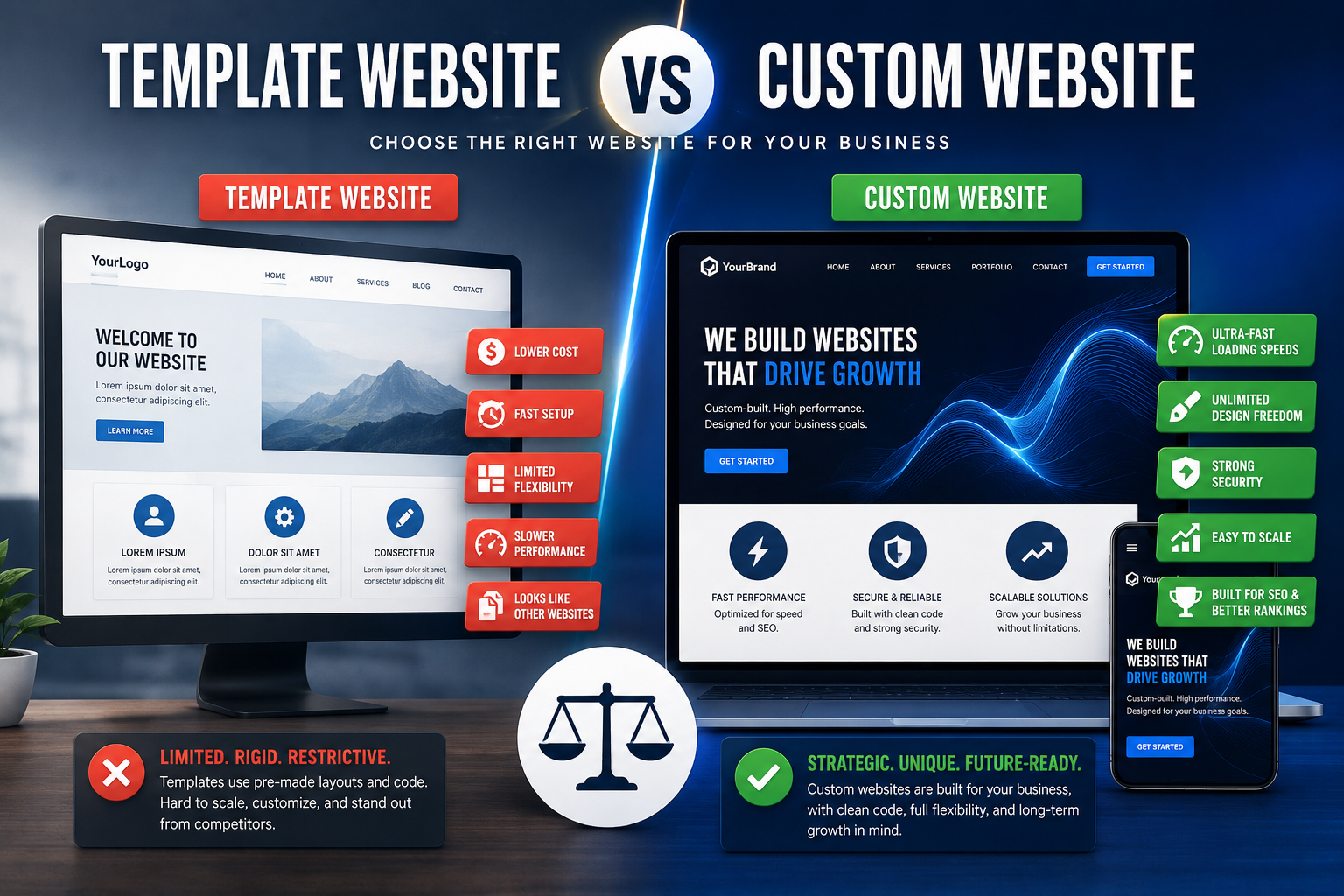
When building a website for your business, one of the first decisions you’ll face is whether to use a website template or invest in a custom built website.
At first glance, templates can seem like the obvious choice. They are inexpensive, quick to launch, and require little technical knowledge. However, as your business grows, the limitations of template based websites often become apparent.
A custom built website, on the other hand, is designed specifically for your business goals, customers, and long term growth strategy.
So which option is right for you?
Let’s break down the key differences between template websites and custom websites so you can make an informed decision.
What Is a Template Website?
A template website is built using a pre designed layout that allows users to replace placeholder content with their own text, images, and branding.
Popular platforms that offer template based websites include:
WordPress themes
Wix templates
Squarespace templates
Shopify themes
Webflow templates
Templates are designed to help businesses get online quickly without the cost of custom development.
While this sounds appealing, there are important trade-offs to consider.
Advantages of Template Websites
Lower Initial Cost
The biggest advantage of a template website is affordability.
Many templates are free or available for a relatively small one time fee.
For startups and hobby projects with limited budgets, this can be an attractive option.
Faster Launch Time
Because much of the design work has already been completed, template websites can often be launched within days rather than weeks.
Businesses that need an online presence quickly may find this beneficial.
Beginner Friendly
Most website builders offer drag and drop editors that make it easy for non-technical users to create pages and update content.
No coding knowledge is required.
Disadvantages of Template Websites
Limited Design Flexibility
Although templates allow for some customization, they are ultimately built around a fixed structure.
This means:
Your website may look similar to competitors using the same theme.
Certain layouts cannot be changed easily.
Unique branding opportunities may be limited.
Your business ends up adapting to the template instead of the template adapting to your business.
Slower Performance
Many templates are built to support hundreds of different features and use cases.
As a result, they often contain large amounts of unnecessary code.
This can lead to:
Slower page load times
Reduced mobile performance
Lower Core Web Vitals scores
Poor user experience
Website speed is a critical ranking factor and directly impacts conversion rates.
Difficult to Scale
As your business grows, you may want advanced functionality such as:
Custom booking systems
Client portals
Membership platforms
Advanced e-commerce features
API integrations
Adding these features to a template website can become expensive, complicated, or impossible depending on the platform.
Security Risks
Templates often rely on multiple third party plugins and extensions.
Each additional plugin creates another potential vulnerability that hackers may exploit.
Poorly maintained themes can also become security liabilities over time.
What Is a Custom Built Website?
A custom-built website is developed specifically for your business from the ground up.
Instead of working within the limitations of an existing template, developers design and build every component around your goals, branding, and customer experience.
The result is a website that is uniquely yours.
Advantages of Custom Websites
Complete Design Freedom
With a custom website, every element is tailored to your business.
You can create:
Unique layouts
Custom animations
Personalized customer journeys
Industry specific functionality
Distinctive branding experiences
Your website becomes a competitive advantage rather than a copy of hundreds of other sites online.
Superior Performance
Custom websites are built using clean, optimized code.
Because developers only include the features your business actually needs, the website remains lightweight and efficient.
Benefits include:
Faster loading speeds
Better mobile performance
Improved user experience
Higher conversion rates
Visitors are more likely to stay on a website that loads quickly and feels responsive.
Better SEO Performance
Search engines reward websites that provide a fast, accessible, and user-friendly experience.
Custom websites often outperform templates because they can be optimized from the ground up for:
Technical SEO
Page speed
Mobile responsiveness
Structured data
Core Web Vitals
These factors contribute to stronger search engine rankings over time.
Scalability for Growth
A custom website grows with your business.
Whether you need:
New service pages
Online payment systems
Customer dashboards
Booking platforms
CRM integrations
Advanced automation
A custom framework provides the flexibility to expand without rebuilding your entire website.
Enhanced Security
Custom websites typically have fewer dependencies and unnecessary plugins.
This reduces attack surfaces and allows developers to implement stronger security practices tailored to your needs.
Disadvantages of Custom Websites
Higher Upfront Investment
Custom development requires professional design, planning, coding, testing, and optimization.
As a result, the initial cost is higher than purchasing a pre-made template.
However, many businesses view this as a long term investment rather than an expense.
Longer Development Timeline
Unlike templates that can be launched quickly, custom websites require time for:
Strategy
Design
Development
Testing
Optimization
Depending on complexity, projects may take several weeks or months to complete.
Which Option Is Best for Your Business?
Choose a Template Website If:
You are launching a personal project.
You need a simple online presence.
Your budget is extremely limited.
You don’t expect significant growth.
You need a website immediately.
Choose a Custom Website If:
Your website generates leads or sales.
You rely on Google search traffic.
You want a unique brand identity.
Performance and speed matter.
You need advanced functionality.
You plan to grow your business over time.
For most established businesses, a custom website delivers significantly greater value in the long run.
Cost vs Value: Looking Beyond the Price Tag
Many business owners focus solely on the upfront cost when comparing templates and custom websites.
A better question is:
“What will this website help my business earn over the next five years?”
A slow website that loses customers every day can cost far more than a custom website that converts visitors into paying clients.
The cheapest solution is not always the most affordable in the long term.
Final Verdict.
Template websites are useful for hobby projects, temporary websites, and businesses operating on extremely tight budgets.
However, if your website plays an important role in generating leads, attracting customers, building trust, or driving online sales, a custom-built website is usually the smarter investment.
Custom websites offer superior speed, flexibility, scalability, branding opportunities, SEO performance, and long term value.
Your website should be one of your most powerful business assets not a limitation that holds your growth back.
Ready to build a website that is designed specifically for your business goals? Contact our team today to discuss a high performance custom website that helps your business stand out and grow online.
If you’re planning to build a website, one of the first questions that comes to mind is:
How much is a website in Uganda?
Whether you’re a small business owner in Kampala, a startup founder, a school administrator, or an NGO director, understanding the real website design cost in Uganda helps you budget properly and avoid being overcharged.
In this complete guide, we break down everything that affects the website price in Uganda, what you should expect to pay, and how to avoid common mistakes.
Why Website Prices in Uganda Vary So Much
If you’ve asked around, you’ve probably received very different quotes:
UGX 300,000
UGX 800,000
UGX 1,500,000
UGX 5,000,000+
So why such a big difference?
Because not all websites are the same.
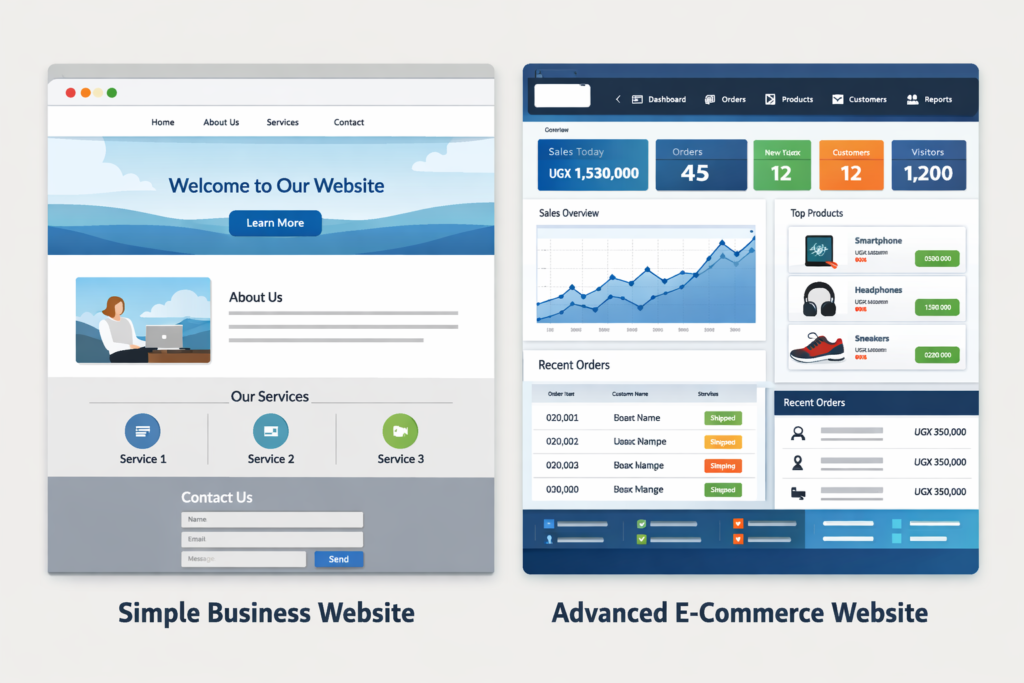
A website can be:
A simple 5-page informational site
A business website with contact forms
An e-commerce store
A booking platform
A custom web application
Each type requires different time, expertise, and technology.
Average Website Design Cost in Uganda (2026 Estimates)
Here’s a realistic breakdown of website prices in Uganda:
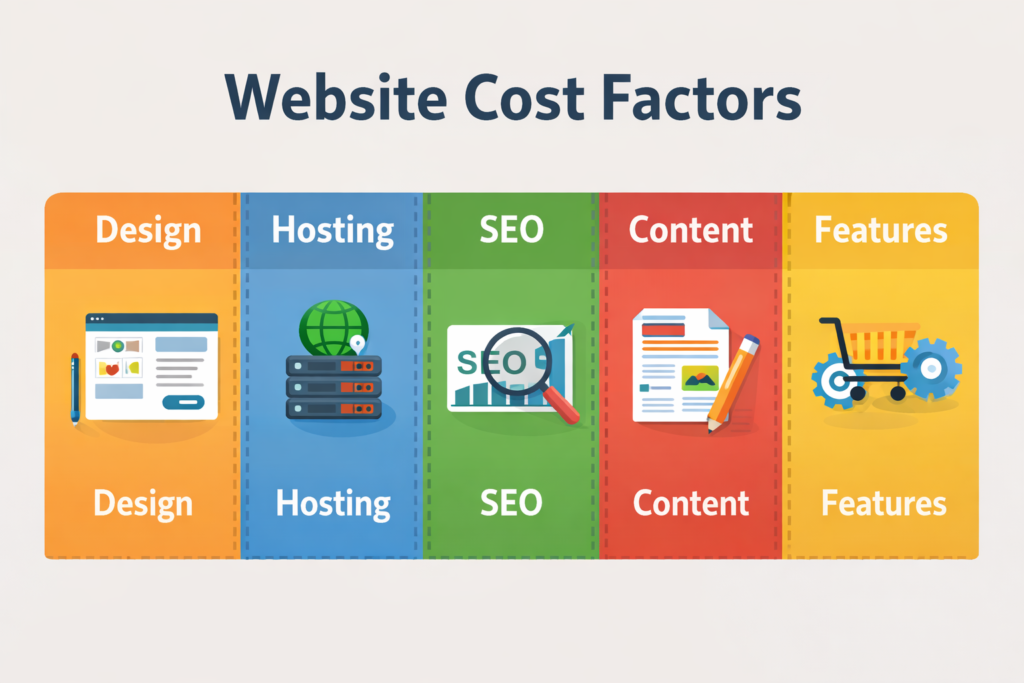
Templates are cheaper. Fully custom designs cost more.
3. E-commerce Features
Payment gateways, inventory systems, and delivery tracking increase complexity.
4. SEO Optimization
If you want your website to rank on Google, proper SEO setup matters.
5. Content Creation
Who writes the website content? Professional copywriting adds cost — but increases conversions.
6. Hosting & Domain Costs
This is separate from design.
Additional Costs to Consider
When calculating how much a website costs in Uganda, don’t forget ongoing costs:
Domain Name
UGX 50,000 – 80,000 per year (.com, .ug, .co.ug)
Hosting
UGX 250,000 – 600,000 per year (depending on speed and storage)
Maintenance (Optional but Recommended)
UGX 300,000 – 1,000,000 per year
Maintenance includes:
Updates
Security monitoring
Backups
Technical support
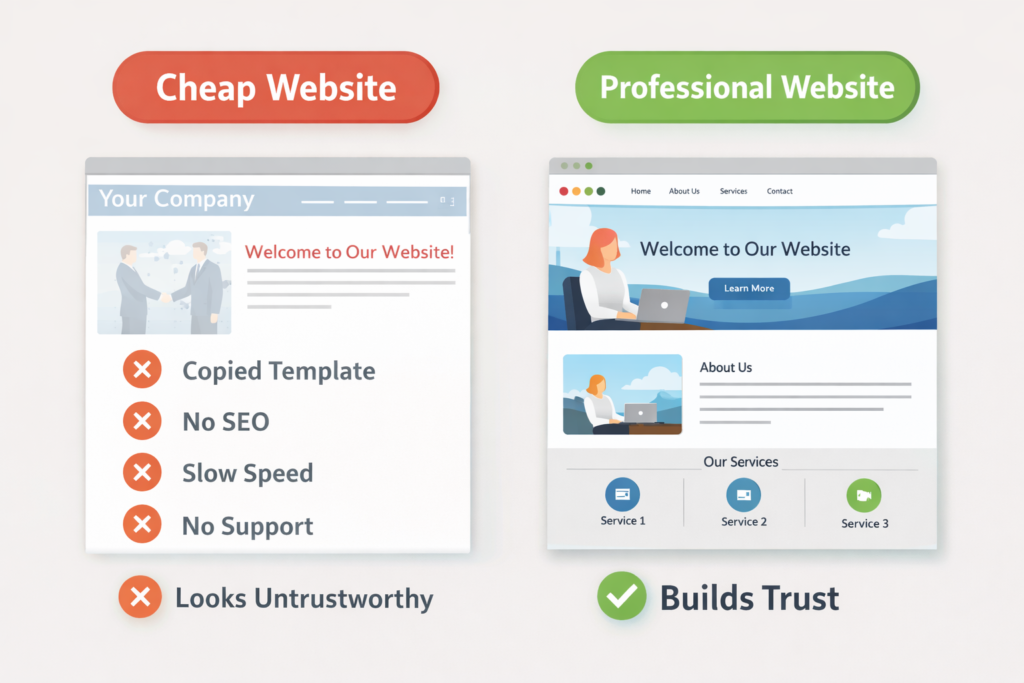
Why Cheap Websites Can Cost You More
Some developers charge UGX 300,000 for a website.
Sounds attractive, right?
But often:
No proper SEO
Slow loading speed
Poor design
No security setup
No support
Copied templates
No strategy behind it
A website is an investment — not an expense.
If your website looks unprofessional, customers may not trust your business.
How to Choose the Right Web Design Company in Uganda
Before hiring a developer, ask:
Do they show past projects?
Do they offer SEO?
Is the website mobile responsive?
Do they provide support after launch?
Is hosting included?
Do they explain the full cost clearly?
A professional company should be transparent about the total website price in Uganda.
Is It Worth Investing in a Website in Uganda?
Absolutely.
Today, most customers search online before buying.
A professional website:
Builds trust
Increases visibility
Attracts new clients
Works for you 24/7
Makes your brand look serious
Even small businesses in Uganda are now competing online.
If you’re not online, you’re invisible.
Final Answer: How Much Is a Website in Uganda?
Here’s the short answer:
Website Type
Estimated Cost (UGX)
Basic Website
600,000 – 1,200,000
Professional Website
1,200,000 – 3,000,000
E-commerce Website
2,500,000 – 6,000,000+
Custom System
5,000,000 – 20,000,000+
The final website design cost in Uganda depends on your goals, features, and long-term strategy.
Need a Professional Website in Uganda?
If you’re ready to build a fast, secure, and professionally designed website tailored to your business goals, it’s important to work with a team that understands both design and strategy.
A well-built website doesn’t just look good — it generates leads and grows your business.
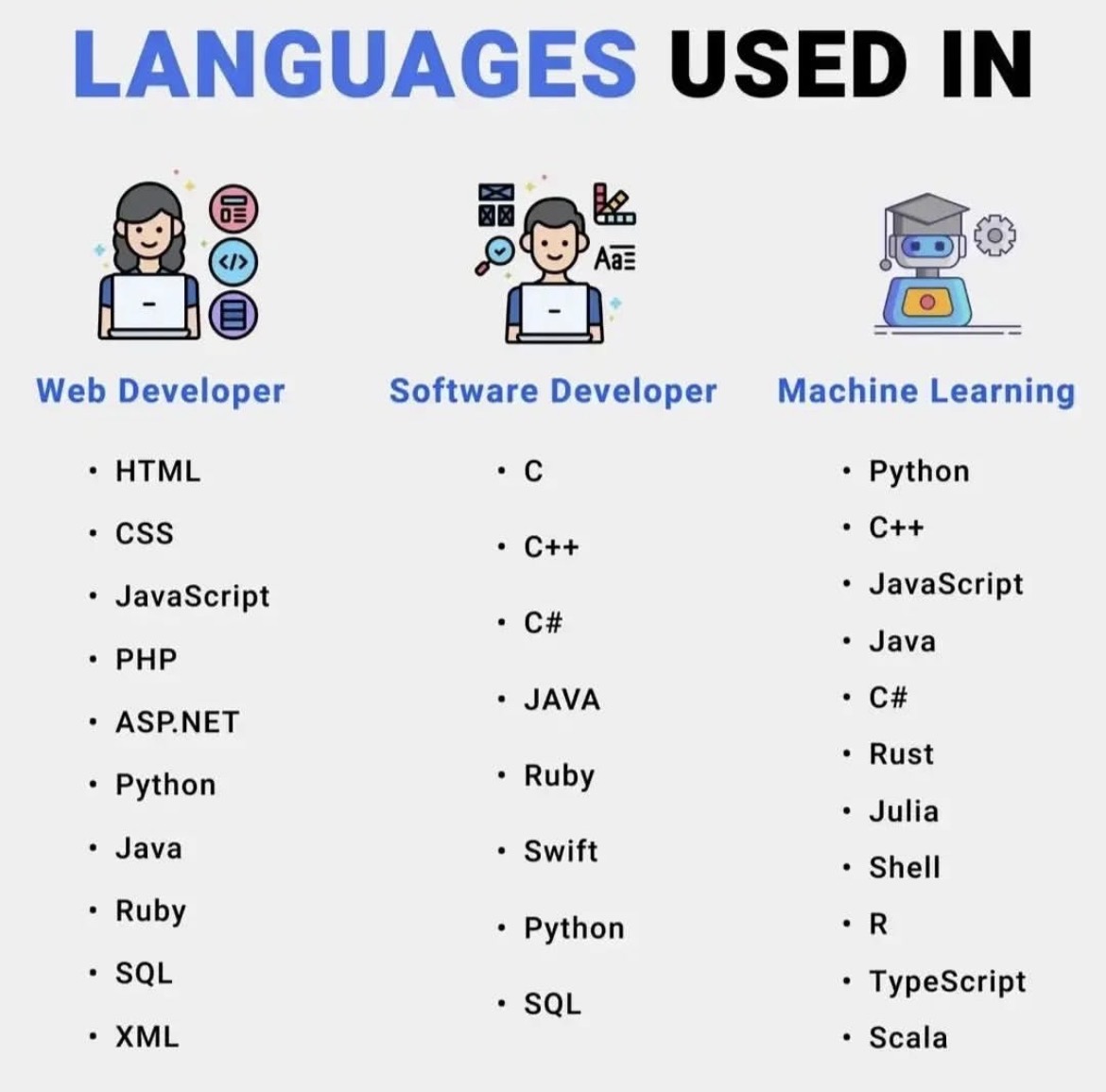
Technology keeps evolving, but one thing remains constant — programming languages are the backbone of the digital world. Whether you’re building websites, developing applications, or training intelligent machines, choosing the right language matters.
In this article, we’ll explore the most commonly used languages in web development, software development, and machine learning, and understand why each one is important.
🌐 Languages Used in Web Development
Web development focuses on building websites and web applications that run in browsers and on servers. A typical web developer works with both front-end (what users see) and back-end (server-side logic).
Key Languages for Web Developers
HTML
HTML (HyperText Markup Language) forms the structure of every website. It defines elements like headings, paragraphs, images, links, lists, and other content, giving a page its basic layout. Without HTML, there would be no organized content for users to read or for browsers to display properly. Think of HTML as the skeleton of a webpage, providing the framework that supports all other elements, including styling and interactivity.
In practice, HTML works together with CSS and JavaScript to create fully functional websites. While HTML lays out the content, CSS controls the visual design, and JavaScript adds dynamic behavior. For example, a form uses HTML to define input fields and buttons, CSS to style them, and JavaScript to validate user input or trigger actions. Proper HTML structure also helps search engines understand and index the content, making it essential for SEO and overall website accessibility.
CSS
CSS (Cascading Style Sheets) controls the design and layout of a website. It determines colors, fonts, spacing, positioning, and responsiveness, shaping how the content defined by HTML appears on different devices. If HTML is the skeleton of a webpage, CSS is the style and fashion, giving the site its visual identity and making it appealing and readable for users.
In real-world web development, CSS works alongside HTML and JavaScript to create fully functional, attractive websites. It allows developers to adjust layouts for desktops, tablets, and mobile devices, apply animations, and maintain consistent branding across pages. Proper use of CSS not only improves user experience but also supports accessibility and performance, making websites easier to navigate and more engaging for visitors.
JavaScript
JavaScript makes websites interactive by allowing elements on a page to respond to user actions. It powers features like clickable buttons, animations, form validation, and real-time updates, bringing life to the content defined by HTML and styled with CSS. Without JavaScript, most websites would feel static, with limited functionality and no dynamic behavior.
In practical use, JavaScript works closely with HTML and CSS to create modern, engaging web experiences. For example, it can check a form for errors before submission, update content without reloading the page, or trigger animations when a user scrolls. By enabling these interactive features, JavaScript enhances user experience, keeps visitors engaged, and allows developers to build more responsive and functional websites.JavaScript makes websites interactive. It allows features like: • Buttons that respond to clicks • Animations • Form validation • Real-time updates
Without JavaScript, most websites would feel static and boring.
PHP
PHP is widely used for server-side web development, handling tasks that run on the server rather than in the user’s browser. It can process form submissions, manage databases, handle user authentication, and generate dynamic content that changes based on user actions. Many popular platforms, including WordPress, rely heavily on PHP to manage data, users, and website functionality behind the scenes.
In real-world applications, PHP works with HTML, CSS, and JavaScript to deliver complete websites. While HTML structures the content, CSS styles it, and JavaScript adds interactivity, PHP ensures that the content is dynamic and personalized, such as displaying a user’s profile, fetching posts from a database, or sending emails. Its ability to integrate with databases like MySQL makes PHP essential for building content management systems, e-commerce sites, and other data-driven websites.
ASP.NET
ASP.NET is a Microsoft framework used for building powerful web applications and enterprise-level websites. It allows developers to create dynamic, scalable, and secure applications that can handle complex business logic and large amounts of data. ASP.NET is especially common in corporate environments and large systems where reliability, performance, and integration with other Microsoft technologies are important.
In practice, ASP.NET works with languages like C# or VB.NET to generate server-side content that interacts with databases, handles user input, and manages application workflows. Combined with HTML, CSS, and JavaScript on the front end, it enables developers to build fully functional websites and web applications that are responsive, secure, and capable of supporting large numbers of users and transactions efficiently.
Python
Python is becoming increasingly popular in web development due to frameworks like Django and Flask, which make building robust web applications faster and more efficient. Its simple, readable syntax and powerful libraries allow developers to handle backend tasks such as database management, user authentication, and server-side logic with ease. Python’s versatility also makes it suitable for integrating APIs, data processing, and other advanced functionality.
In real-world web development, Python works on the server side to generate dynamic content, process user requests, and communicate with databases. When combined with HTML, CSS, and JavaScript on the front end, Python frameworks enable developers to build full-featured websites and applications that are scalable, maintainable, and secure. Its growing popularity is fueled by the balance it strikes between simplicity and power, making it a favorite among both beginners and experienced developers.
Java
Java is widely used in enterprise-level web systems and large-scale applications that demand stability, security, and high performance. Its strong type system, robust libraries, and platform independence make it ideal for building complex backend systems, handling large volumes of data, and supporting critical business operations. Many banks, corporations, and large organizations rely on Java for their web infrastructure because of its reliability and scalability.
In practical web development, Java works on the server side to process requests, manage databases, and generate dynamic content for users. Frameworks like Spring and Java EE allow developers to create secure, modular, and maintainable applications, which integrate seamlessly with front-end technologies like HTML, CSS, and JavaScript. By combining these tools, Java enables the creation of enterprise-grade websites and applications that can handle heavy traffic while maintaining consistent performance and security.
Ruby
Ruby, especially when used with the Ruby on Rails framework, allows developers to build web applications quickly and efficiently. Its elegant, readable syntax encourages clean code and rapid development, making it easier to maintain and scale projects over time. Ruby on Rails provides built-in tools for common tasks like database management, routing, and user authentication, which speeds up development and reduces repetitive work.
In real-world web development, Ruby on Rails powers dynamic websites and applications by handling backend logic, database interactions, and server-side processing. When combined with HTML, CSS, and JavaScript on the front end, it enables developers to create full-featured, interactive web apps with minimal boilerplate code. Its focus on convention over configuration and developer productivity makes Ruby a popular choice for startups and projects that need to launch quickly without sacrificing maintainability.
SQL
SQL (Structured Query Language) is used to manage databases, allowing websites and applications to store, organize, and retrieve information efficiently. It handles data such as user accounts, products, transactions, and other critical content, making it essential for dynamic websites that rely on constantly changing information. SQL ensures that data can be accessed, updated, and managed securely and accurately.
In real-world web development, SQL works on the backend alongside server-side languages like PHP, Python, or Java to interact with databases. For example, when a user logs in, SQL queries fetch their account details; when a product is added to a shopping cart, SQL updates the inventory. By providing structured, reliable access to data, SQL enables websites and applications to function smoothly, handle large volumes of information, and deliver personalized experiences to users.
XML
XML (eXtensible Markup Language) is used for storing and transporting structured data between systems and web services. It provides a standardized format that is both human-readable and machine-readable, making it ideal for exchanging information across different platforms, applications, and devices. XML allows developers to define custom tags and organize data hierarchically, ensuring that complex information can be transmitted and understood consistently.
In real-world web development, XML is often used in APIs, configuration files, and data feeds to transfer information such as product catalogs, user settings, or transactional data. While modern alternatives like JSON are increasingly popular, XML remains important in enterprise systems and legacy applications where structured, platform-independent data exchange is required. Its ability to maintain clear data structure and compatibility makes it a reliable tool for integrating disparate systems and services.
⸻
💻 Languages Used in Software Development
Software development involves creating desktop apps, mobile apps, and system-level software.
Core Software Development Languages
C
C is one of the oldest and most influential programming languages, first developed in the early 1970s. Despite its age, it remains extremely powerful because it allows developers to work very close to the hardware while still providing structured programming features. Its efficiency, speed, and control over system resources make it a foundation for many modern languages like C++, Java, and even Python in some low-level modules.
In real-world applications, C is widely used for system programming, including operating systems like Linux and Windows, where it manages core functions such as memory allocation, process scheduling, and device communication. It is also a favorite for embedded systems, powering devices like routers, smart home appliances, medical instruments, and even automotive control systems. Because of its reliability and performance, C continues to be a critical language in industries where efficiency and precision are essential.
C++
C++ builds on the C programming language and extends it by adding object-oriented features such as classes, inheritance, and polymorphism, which allow developers to write more structured and reusable code. At the same time, C++ still gives low-level control over memory and system resources, making it both powerful and efficient. This combination of high-level design and low-level performance is what makes C++ one of the most versatile programming languages in the world.
In real-world applications, C++ is widely used in game development, high-performance software, and system-level programming. Popular game engines like Unreal Engine are written in C++, and many AAA games rely on it for graphics, physics, and real-time performance. C++ is also used to build operating systems, web browsers, databases, and financial trading systems where speed and resource efficiency are critical. For example, parts of Windows, Linux, Google Chrome, and even Python itself are implemented using C++.
C#
C# is a programming language developed by Microsoft and is mainly used for building applications within the Windows ecosystem and beyond. It is commonly used to create Windows desktop applications, web applications using the .NET framework, and large enterprise systems that require strong performance, security, and scalability. Because C# integrates deeply with Microsoft technologies, it is a popular choice for companies that rely on Windows servers and cloud services like Azure.
In real-world use, C# is also one of the leading languages for game development through the Unity game engine, which is used to build popular games for PC, mobile, consoles, and even virtual reality. Many business applications, such as accounting systems, hospital management software, and corporate tools, are built with C# because it offers a good balance between ease of development and powerful features for handling complex logic and large user bases.
Java
Java is known for its reliability and strong cross-platform compatibility, which means code written in Java can run on different operating systems without major changes. This is possible because Java runs on the Java Virtual Machine (JVM), allowing developers to follow the principle of “write once, run anywhere.” As a result, Java is widely used in large-scale systems where stability, performance, and long-term support are critical.
In real-world applications, Java powers Android apps, enterprise software, and many global banking and financial systems. Most Android applications are built using Java or Java-based technologies, while companies use Java to develop backend services, payment platforms, and cloud-based systems. Major organizations like banks, airlines, and e-commerce platforms rely on Java to process millions of transactions daily, handle secure user data, and ensure their systems remain reliable under heavy traffic.
Ruby
Ruby is appreciated for its simplicity and developer-friendly syntax, which makes it easy to learn and enjoyable to work with, especially for beginners and small development teams. The language was designed to focus on developer productivity, so many complex tasks can be written in fewer lines of code compared to other languages. This is one of the reasons many startups choose Ruby, as it allows them to build and update applications quickly without sacrificing code readability or maintainability.
In real-world backend development, Ruby is most commonly used with the Ruby on Rails framework. Popular platforms like GitHub and Shopify use Ruby on Rails to handle core features such as user accounts, authentication, product management, payments, and APIs. On the frontend side, Ruby helps generate dynamic web pages by rendering HTML on the server before sending it to the browser, making it possible to build full-stack applications where Ruby manages both the business logic and the user interface flow.
Swift
Swift is a modern programming language developed by Apple and officially introduced in 2014 as a replacement for Objective-C. It is primarily used for building applications across Apple’s ecosystem, including iPhones, iPads, Macs, Apple Watch, and Apple TV. One of Swift’s biggest advantages is that it is designed to be fast, safe, and easy to read, making it a popular choice for both beginners and professional developers.
To develop apps using Swift, you need a Mac computer because Apple’s official development environment, Xcode, only runs on macOS. Xcode is an integrated development environment (IDE) provided by Apple that includes everything needed to build apps, such as a code editor, interface builder, simulator for testing apps on virtual devices, and powerful debugging tools. Swift also supports modern features like automatic memory management, strong type safety, and real-time error checking, which help developers catch mistakes early and write more reliable software.
An interesting fact many people don’t know is that Swift is open-source, meaning developers can use it outside Apple platforms too, such as for building server-side applications with frameworks like Vapor. However, its strongest and most common use is still native Apple app development, where it offers the best performance and full access to Apple’s latest APIs and features
Python
Python is also widely used in software development, especially for automation, internal tools, and desktop applications. Because of its simple and readable syntax, Python allows developers to write programs quickly, which makes it ideal for automating repetitive tasks such as file management, data processing, system monitoring, and testing workflows.
In addition, Python is often used to build desktop applications using frameworks like Tkinter, PyQt, and Kivy, which make it possible to create graphical user interfaces (GUIs) for Windows, macOS, and Linux. Many popular software tools and platforms rely on Python behind the scenes, including parts of YouTube, Instagram, Dropbox, and Spotify. Another lesser-known fact is that Python is frequently used as a “glue language,” meaning it connects different systems, APIs, and services together, helping companies integrate software faster without rewriting everything from scratch.
SQL
SQL also (Structured Query Language) is essential for handling data storage in software applications because it is the standard language used to communicate with relational databases. It allows developers to create, read, update, and delete data, which are the core operations behind almost every digital system, from simple websites to large enterprise platforms. Without SQL, applications would not be able to store user accounts, process transactions, manage content, or retrieve information efficiently.
In the backend of most systems, SQL works behind the scenes as the main way the application interacts with its database. For example, when a user logs into a website, the backend sends an SQL query to check the username and password stored in the database. When someone places an order on an e-commerce site, SQL is used to save the order details, update stock levels, and generate invoices. Backend technologies like Node.js, PHP, Python (Django, Flask), Java (Spring), and .NET all rely on SQL queries to fetch and manipulate data.
A lesser-known but important fact is that SQL also plays a major role in performance and security. Well-written SQL queries can make applications much faster by reducing load times and server costs, while poorly written queries can slow down entire systems. SQL is also used to define user permissions, meaning it controls who can access, modify, or delete sensitive data, which is critical for systems like banking apps, hospital records, and government platforms. In short, SQL is the backbone of backend data management in almost all modern software systems.
⸻
🤖 Languages Used in Machine Learning
Machine learning focuses on building intelligent systems that can learn from data and make decisions.
Popular Machine Learning Languages
Python
Python dominates machine learning because of its simplicity, readability, and powerful libraries like TensorFlow, PyTorch, and scikit-learn. These tools make it easy to build, train, and deploy machine learning and AI models, from image recognition to natural language processing. Its large community and extensive documentation also help developers solve problems quickly and efficiently.
In real-world applications, Python is used across industries for predictive analytics, recommendation systems, autonomous vehicles, and AI-powered chatbots. It handles data processing, model training, and integration with web and mobile applications, making it the go-to language for both research and production in artificial intelligence and machine learning.
C++
C++ is used in machine learning and AI when performance and speed are critical, particularly in production environments that require low-latency computations. Its efficiency and control over memory management make it ideal for implementing resource-intensive algorithms, optimizing model inference, and powering high-performance applications like computer vision, robotics, and real-time simulations.
In real-world AI systems, C++ is often used to build the core components of frameworks like TensorFlow or PyTorch, or in scenarios where models need to run on devices with limited resources, such as embedded systems or autonomous vehicles. By combining speed with precision, C++ ensures that machine learning applications can process large datasets and perform complex calculations quickly and reliably.
JavaScript
JavaScript enables machine learning models to run directly in the browser using libraries like TensorFlow.js. This allows developers to build interactive AI applications that don’t require server-side processing, making it possible to perform tasks like image recognition, natural language processing, or predictive analytics entirely on the client side.
In real-world use, JavaScript-based machine learning is applied to web apps, browser games, and interactive dashboards where real-time inference is needed without sending data to a server. This approach improves privacy, reduces server load, and allows users to experience AI features instantly, all while leveraging the accessibility and ubiquity of the web.
Java
Java is widely used in machine learning and AI for building enterprise-grade applications where stability, scalability, and performance are crucial. Its strong type system, portability, and mature ecosystem make it ideal for deploying machine learning models in production environments, especially when handling large volumes of data or integrating with existing corporate systems.
In real-world applications, Java is used to create backend services that run machine learning models, process big data with frameworks like Apache Spark, and support real-time analytics or recommendation engines. Its ability to deliver reliable, high-performance solutions makes it a preferred choice for large-scale AI systems in finance, e-commerce, and other enterprise sectors.
C#
C# is a modern, versatile programming language developed by Microsoft as part of its .NET ecosystem. It combines the power of object-oriented programming with an easy-to-read syntax, making it ideal for building a wide range of applications. C# is especially strong for Windows-based development, allowing developers to create desktop applications, web services, and cloud-based solutions that integrate seamlessly with Microsoft tools and platforms. Its robust type system and built-in memory management also make it reliable for large-scale projects.
In real-world applications, C# is widely used for Windows desktop software, enterprise systems, and web applications built on ASP.NET. It’s also one of the leading languages for game development using the Unity engine, powering popular games on PC, mobile, and consoles. Beyond games, C# is used in industries like finance, healthcare, and logistics to build scalable, secure systems that handle complex business logic and large volumes of data efficiently.
Rust
Rust is gaining popularity in machine learning for building high-performance and memory-safe systems. Its strong emphasis on safety and concurrency ensures that applications run efficiently without common issues like memory leaks or race conditions, making it ideal for resource-intensive AI workloads.
In practice, Rust is used for developing machine learning libraries, real-time data processing systems, and performance-critical components of AI applications. Its combination of speed, safety, and modern tooling allows developers to create reliable machine learning solutions that can handle large datasets and complex computations while minimizing runtime errors and improving overall system stability.
Julia
Julia is designed for scientific computing and high-speed numerical analysis, making it well-suited for machine learning and data-intensive applications. Its syntax is simple and expressive, while its performance approaches that of low-level languages like C, allowing developers to run complex computations efficiently.
In real-world machine learning, Julia is used for tasks like numerical simulations, algorithm development, and large-scale data analysis. Its ability to handle high-performance calculations and work seamlessly with mathematical and statistical libraries makes it popular in research, finance, engineering, and AI projects that require fast, accurate computation.
Shell
Shell scripting is used to automate machine learning workflows and manage data pipelines efficiently. By writing scripts for tasks like data preprocessing, model training, deployment, and system maintenance, developers can save time, reduce errors, and ensure processes run consistently.
In practical applications, shell scripts are often used to schedule training jobs, move or clean datasets, trigger model evaluations, and deploy models to servers or cloud environments. Automation through shell scripting ensures that machine learning pipelines are reliable, repeatable, and easier to maintain, especially when handling large datasets or complex workflows.
R
R is widely used in machine learning for statistics, data analysis, and visualization. Its rich set of packages and built-in functions make it easy to explore data, perform statistical modeling, and create detailed visualizations to understand patterns and trends. This makes R especially valuable for research, academic projects, and data-driven decision-making.
In real-world applications, R is used to analyze datasets, build predictive models, and generate charts or dashboards that help interpret machine learning results. Its focus on statistical accuracy and visualization makes it a popular choice in healthcare, finance, social sciences, and any field that relies heavily on data insights.
TypeScript
Java is often used alongside JavaScript frameworks to build scalable, machine learning–powered web applications. While Java handles the backend processing, data management, and model deployment, JavaScript frameworks manage the frontend, enabling interactive interfaces and real-time user experiences.
In real-world scenarios, this combination is used to create applications like recommendation engines, analytics dashboards, and AI-driven web services. Java ensures reliable performance and scalability on the server side, while JavaScript delivers dynamic, responsive interfaces in the browser, allowing machine learning models to serve users efficiently and at scale.
Scala
Scala is often used with big data tools like Apache Spark for building large-scale machine learning systems. Its functional programming features and seamless integration with Spark make it ideal for processing massive datasets, performing distributed computations, and developing scalable ML pipelines.
In real-world applications, Scala with Spark is used for tasks like real-time analytics, recommendation engines, predictive modeling, and fraud detection. By combining Scala’s performance and expressiveness with Spark’s distributed computing power, organizations can efficiently handle complex machine learning workflows and deliver fast, reliable insights from large volumes of data.
⸻
🧠 Final Thoughts
Every programming field has its own set of important languages:
Field Main Focus Key Languages Web Development Websites & web apps HTML, CSS, JavaScript, PHP, Python Software Development Apps & systems C, C++, Java, C#, Swift Machine Learning AI & data models Python, R, Java, Julia
You don’t need to learn everything at once. Start with one path and grow step by step.